What is RAG?
Imagine you ask a friend:
“What’s the penalty for breaking my loan agreement early?”
If your friend doesn’t know but quickly checks the contract, finds the exact clause, and then answers you — that’s RAG in action.
RAG (Retrieval-Augmented Generation) combines two steps:
Retrieve → Search your documents or knowledge base for relevant info.
Generate → Use an LLM to answer, based only on that retrieved info.
This prevents the AI from hallucinating and ensures answers are accurate, traceable, and grounded in real data.
For a short primer, here’s a great explainer:
A Quick Note on LangChain
To build our assistant, we’ll use LangChain — a framework that makes it easier to work with LLMs by providing building blocks.
Key features of LangChain:
Document Loaders → Extract text from PDFs, Word files, websites, etc.
Text Splitters → Break large documents into chunks.
Embeddings & Vector Stores → Convert chunks into embeddings and store them for fast semantic search.
Chains & Agents → Orchestrate retrieval + reasoning flows.
Analogy: If AI development is cooking, LangChain is your pre-stocked kitchen with ingredients (loaders, splitters, embeddings) and utensils (chains, retrievers).
In our project, LangChain will stitch together all steps of the RAG pipeline: Load PDFs → Split → Embed → Store → Retrieve → Answer.
Roadmap: From Basics to Agentic Workflows
Here’s the phased roadmap we’ll follow (see image):
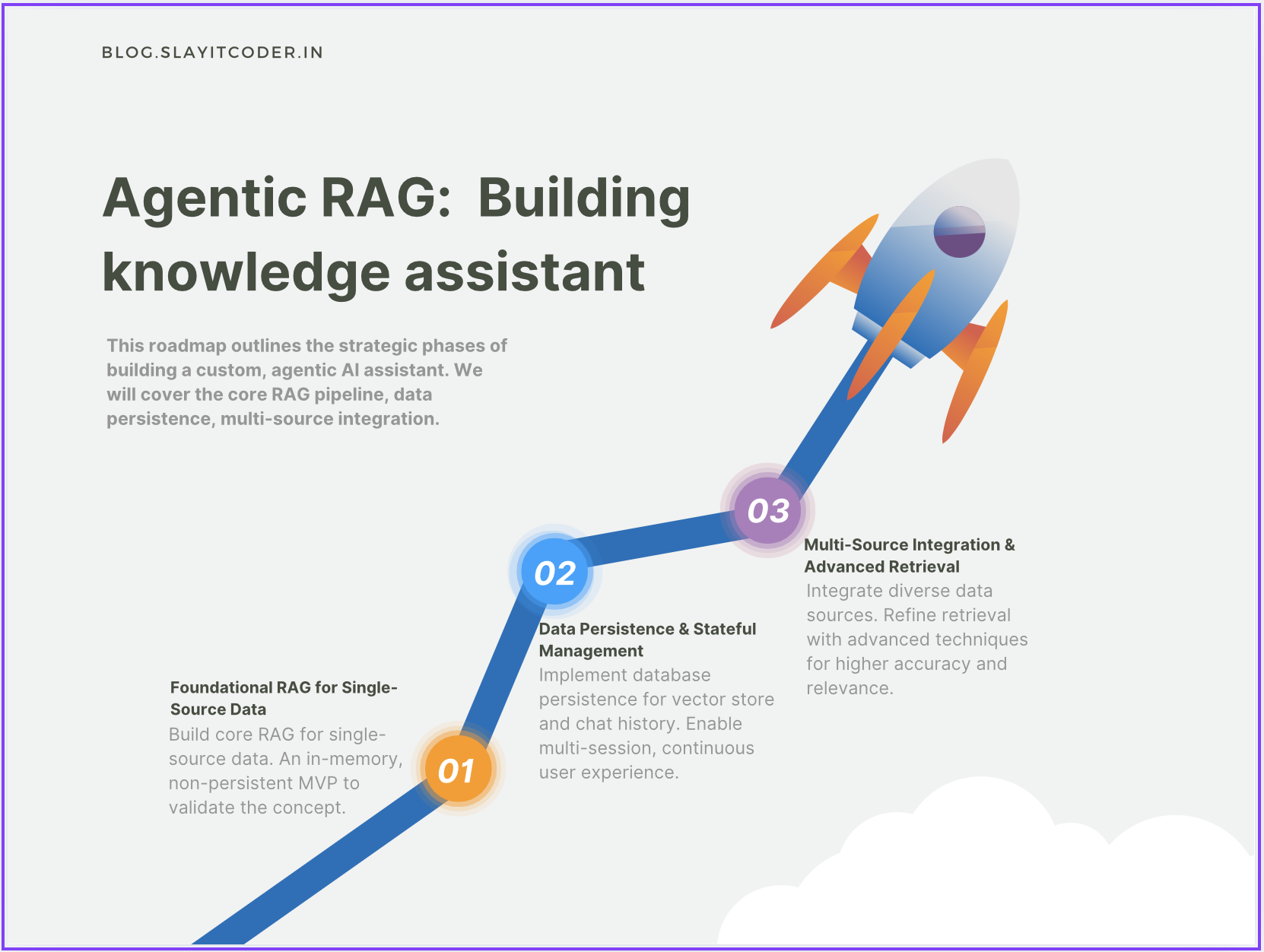
Foundational RAG for Single-Source Data
Core pipeline that works with one source (like a single PDF).
Data Persistence & Stateful Management
Store embeddings and chat history in a database for multi-session use.
Multi-Source Integration & Advanced Retrieval
Support multiple data sources with refined retrieval strategies.
Agentic Workflows (Future Phase)
Move beyond Q&A to assistants that can take proactive, goal-oriented actions.
High-Level Design (HLD)
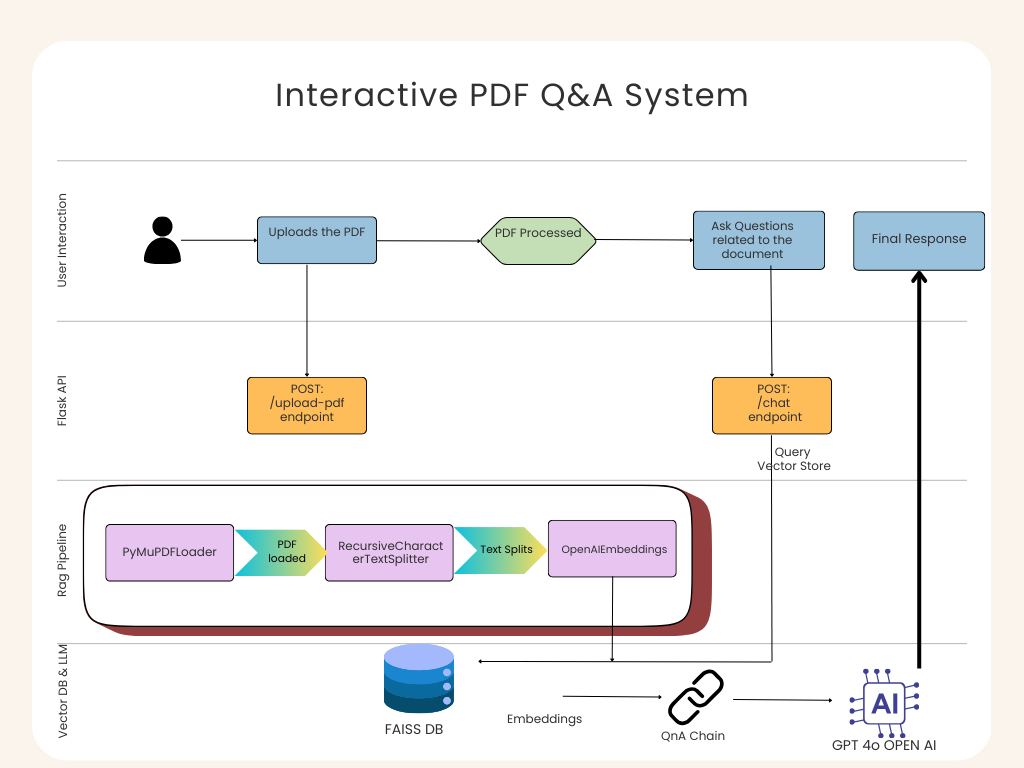
Let’s walk through the architecture row by row (see diagram):
1. User Interaction (Top Row)
The user uploads a PDF or types a question in a React web app.
The React app sends requests to the backend.
This keeps the interface clean: upload → ask → get an answer.
2. Flask/FastAPI Backend (Middle Row)
The React app talks to a backend server via two endpoints:
/upload-pdf → Handles document upload and processing.
/chat → Handles queries and returns responses.
The backend acts like a traffic controller, directing data between UI and the RAG pipeline.
3. RAG Pipeline (Row 3)
This is the core engine powered by LangChain:
PyMuPDFLoader → Extracts text and metadata from PDFs.
RecursiveCharacterTextSplitter → Splits large text into overlapping chunks.
OpenAIEmbeddings → Converts chunks into embeddings (vectors).
FAISS Vector Store → Stores embeddings for fast similarity search.
4. Vector DB & LLM (Bottom Row)
FAISS DB → Think of it as Google Search for your document.
Retriever & QnA Chain → Fetches context + combines with your query.
ChatOpenAI (GPT-4o) → Generates the final human-like answer.
Diving into the Code: The RAG Pipeline
1. Data Ingestion: Loading and Splitting
from langchain.document_loaders import PyMuPDFLoader
from langchain.text_splitter import RecursiveCharacterTextSplitter
# Load PDF
loader = PyMuPDFLoader("sample.pdf")
documents = loader.load()
# Split into chunks
splitter = RecursiveCharacterTextSplitter(
    chunk_size=1000,
    chunk_overlap=200
)
chunks = splitter.split_documents(documents)
Loader extracts raw text + metadata (page numbers, file name).
Splitter ensures text is chopped neatly without losing context.
2. Embedding and Indexing
from langchain.embeddings import OpenAIEmbeddings
from langchain.vectorstores import FAISS
# Generate embeddings
embeddings = OpenAIEmbeddings()
# Create FAISS index
vector_store = FAISS.from_documents(chunks, embeddings)
Embeddings turn text into dense vectors.
FAISS stores them in memory for quick similarity search.
3. Retrieval and Answer Generation
from langchain.chains import RetrievalQA
from langchain.chat_models import ChatOpenAI
# Create retriever
retriever = vector_store.as_retriever()
# Q&A chain
qa_chain = RetrievalQA.from_chain_type(
    llm=ChatOpenAI(model="gpt-4o-mini"),
    retriever=retriever
)
# Ask a question
response = qa_chain.run("What is the penalty for early termination?")
print(response)
Retriever finds the top relevant chunks.
Q&A chain combines user question + retrieved chunks → sends to LLM.
LLM answers only using that context.
4. FastAPI Endpoints
In main.py, we expose simple APIs:
from fastapi import FastAPI, UploadFile
from rag_pipeline import process_pdf, qa_chain
app = FastAPI()
@app.post("/upload-pdf")
async def upload_pdf(file: UploadFile):
    return process_pdf(file)
@app.post("/chat")
async def chat(question: str):
    return {"answer": qa_chain.run(question)}
Example Flow in Action
User uploads contract.pdf in the React app.
Backend processes it → loads, splits, embeds, stores in FAISS.
User asks: “What is the penalty for early withdrawal?”
Backend retrieves the relevant clause (page 12).
ChatOpenAI forms a natural response:
“According to page 12, early withdrawal incurs a 2% fee if done within 6 months.”
Wrapping Up
With Phase 1, we now have:
✅ A working RAG pipeline for single PDFs
✅ A clean separation between frontend, backend, and AI pipeline
✅ Grounded, document-aware answers
Next steps:
Add persistence (so embeddings don’t vanish on restart)
Support multiple documents
Explore advanced retrieval techniques
Move towards agentic workflows
This is just the beginning of turning your PDFs into a personal knowledge assistant
Resources & Connect
If you’d like to dive deeper or try this project yourself:
🔗 Complete Code on GitHub: RAG Study Assistant
📝 More Blogs & Tutorials: SlayItCoder Blog
💼 Let’s Connect on LinkedIn: Pushkar Singh
I’ll continue updating both the blog and GitHub repo as we progress through the later phases of the Agentic RAG roadmap. Stay tuned — exciting things ahead