Welcome back to our journey of building an RAG Driven Knowledge Assistant — a system designed to make your data truly interactive, persistent, and personalized.
In Phase 1, we built the foundational RAG pipeline — proving how data from a single document can be loaded, chunked, converted into embeddings, and finally queried by passing localized context to LLM. But that version was still a prototype, not yet ready for real-world persistence as it had few major limitations which we will discuss further in the Blog.
Let’s quickly recap where we were, what was missing, and how Phase 2 evolves us toward a truly stateful RAG system. If you are new to this series i highly recommend checking out the part 1 of Building your own RAG.
Phase 1 Recap — Foundational RAG for Single-Source Data
Phase 1 gave us a good foundationational learning of the core concepts wherein:
Users could upload a single PDF.
The system loads (PyMuPDFLoader), split it into chunks(RecursiveCharacterTextSplitter) , generated embeddings(OpenAIEmbeddings) , and stored them in a temporary in memory FAISS index.
A chat endpoint handled user questions by retrieving relevant chunks and generating grounded responses through GPT-4o-mini.
However, it had three key limitations:
No Persistence: The FAISS index was temporary and in-memory only — all context lost after every restart.
No User Sessions: The system couldn’t differentiate users or retain chat history.
Single Document Scope: One file only, no cross-document reasoning.
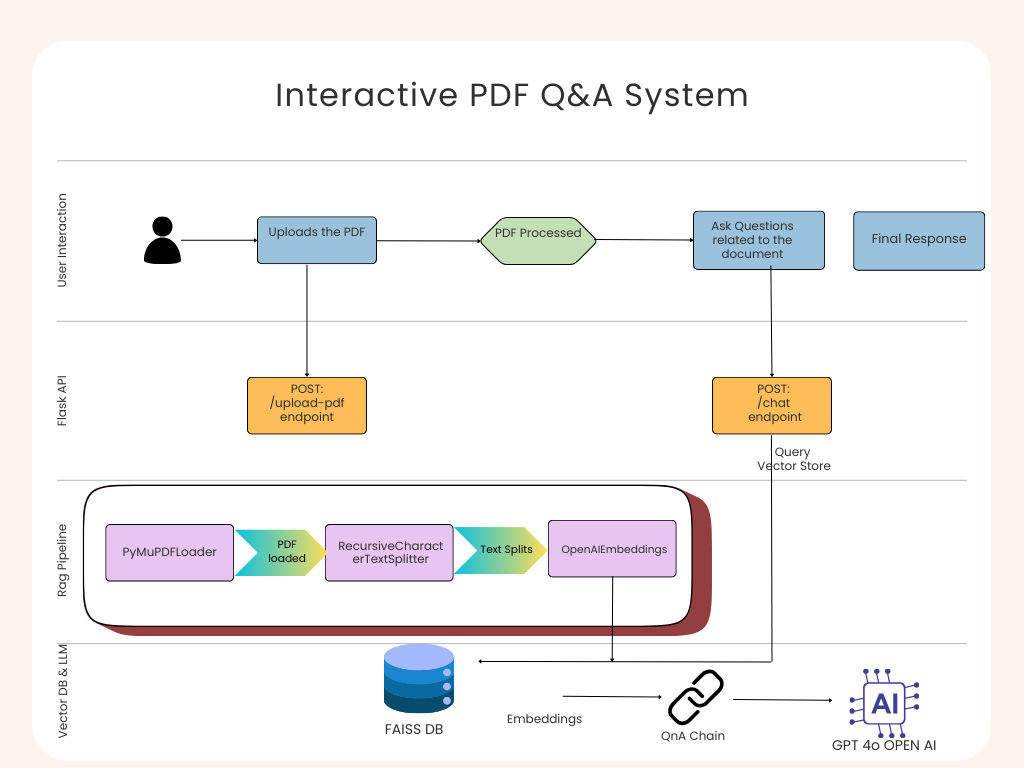
Figure: Phase 1 Architecture (Interactive PDF Q&A System)
So we tried to improve our system further making it more robust and moving close to actual Production grade application in Phase 2.
Phase 2 Roadmap — Data Persistence & Stateful Management
According to our roadmap from blog.slayitcoder.in, Phase 2 focuses on making the RAG system stateful, persistent, and user-aware — bridging the gap between a demo and a deployable product.
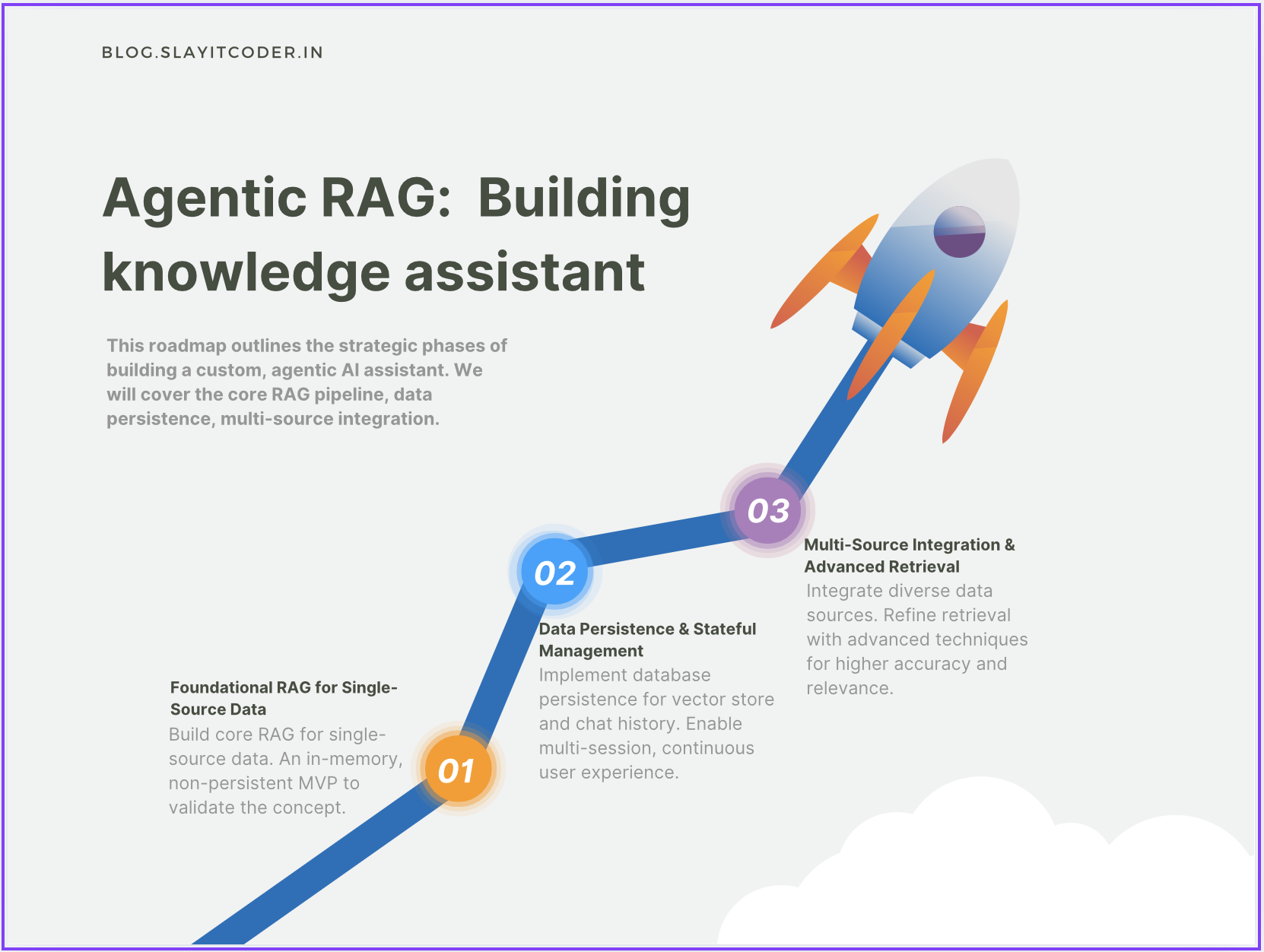
Figure: Agentic RAG Roadmap
Key focus areas for Phase 2:
Implement database persistence for vector stores (FAISS) and chat sessions (Postrgres).
Enable multi-session and multi-document retrieval.
Build a stateful user data management layer for seamless experiences.
Phase 2 Architecture — RAG with Persistent Sessions
The architecture now introduces Session/User Data Management and Persistent Vector Datastores as first-class layers in the system.
Let’s walk through the flow and discuss each layer in detail.
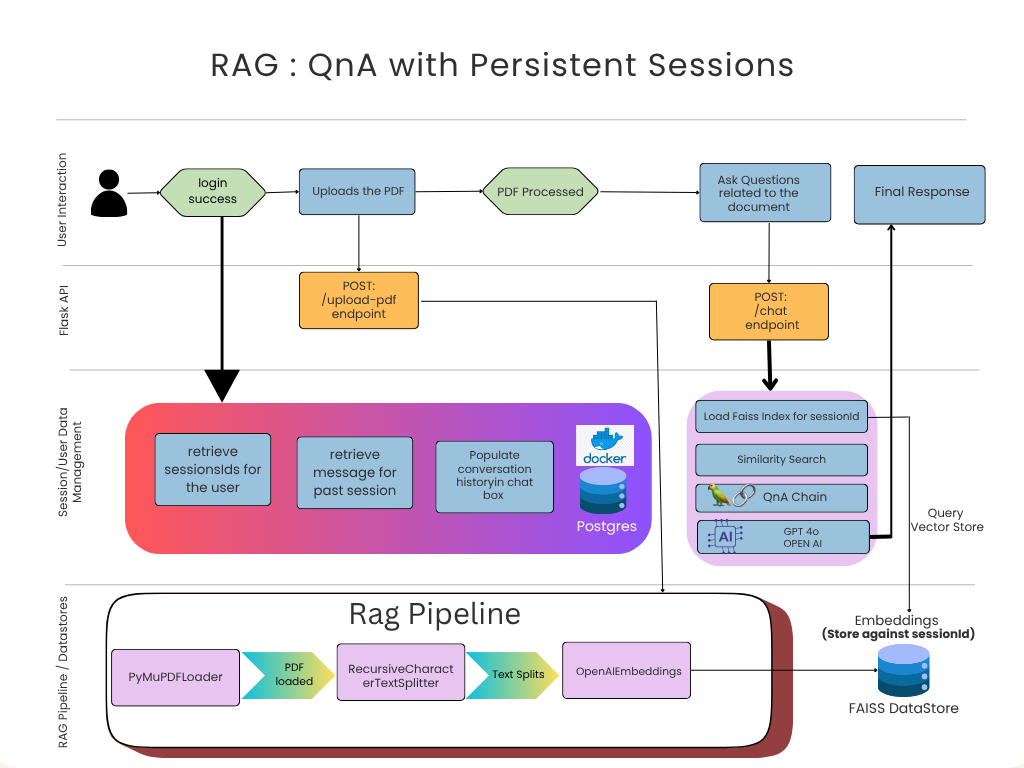
Figure: Phase 2 HLD (RAG QnA with Persistent Sessions)
1. User Journey
The user begins by logging into the system with valid credentials. Once authenticated, the Session and User Data Management layer takes charge:
If it’s a new user, the system generates a unique session_id and initializes fresh stores.
If it’s a returning user, it retrieves their existing sessions, previously uploaded PDFs, and chat history from PostgreSQL and FAISS.
This allows users to pick up exactly where they left off — whether continuing an old chat or adding new documents to expand their knowledge base.
Because embeddings are persisted, users don’t have to reprocess documents every time. This not only saves time but also reduces API costs, since embedding generation via OpenAI APIs incurs per-token charges.
2. Persistent Vector Store (FAISS DataStore)
In Phase 1, all embeddings were stored in-memory and lost on restart. Now, we’ve made the FAISS index persistent and session-scoped:
Each session’s embeddings are serialized to disk using FAISS.save_local().
When a user returns, their vector index is instantly restored using FAISS.load_local().
Each user/session maintains its own FAISS index file, enabling personalized, isolated retrieval across multiple documents.
This ensures that the RAG pipeline always retrieves context from the correct set of documents associated with the user.
3. PostgreSQL for Stateful Session Management
To complement FAISS persistence, we introduced PostgreSQL as the backbone for session, user, and message tracking. This relational layer ensures that both conversational continuity and metadata management are durable and queryable.
Key roles of Postgres in our system:
Session Tracking: Each user session has a unique session_id stored and linked to the user account.
Document Metadata: Every uploaded PDF is associated with its session, enabling session-specific retrieval.
Chat History: All messages (user queries + model responses) are stored in chronological order, preserving full conversational context.
Even after a server restart or user logout, both the vector embeddings (from FAISS) and the conversation history(from Postgres) can be seamlessly reloaded — creating a true memory-driven RAG system.
4. Putting It All Together
Here’s how the flow works end-to-end:
Login Success: User logs in → session_id is verified or created.
Session Retrieval: System fetches user’s previous sessions and message history from Postgres.
PDF Upload: New PDFs are processed → chunks embedded via OpenAI → embeddings saved to FAISS under that session_id.
Chat Interaction:
On every question, FAISS index (per session) is loaded.
Similarity search retrieves relevant chunks.
Chat history is appended, forming a rich context.
GPT-4o generates an answer, which is then stored back in Postgres.
This architecture now supports multi-user, multi-document, persistent conversations — the foundation of a scalable RAG assistant.
RAG Workflow in Action — From Login to Response
Let’s walk through the new workflow step by step:
Login Success: User authenticates, generating a unique session_id.
Document Upload:
/upload-pdf endpoint accepts both the file and session_id.
PDF is chunked, embedded, and saved in a FAISS index dedicated to that session.
Conversational Query:
/chat endpoint receives query + session_id.
Retrieves chat history from Postgres and loads the relevant FAISS index.
Runs similarity search → QnA Chain → GPT-4o → response generated.
The new message pair is stored back into Postgres for continuity.
This architecture now supports multi-document reasoning, multi-user handling, and session continuity — setting the foundation for Phase 3: Multi-Source RAG & Advanced Retrieval.
Complete Video Demo (Architecture + Code Walkthrough)
If you prefer learning visually — I’ve recorded a complete walkthrough of the RAG Phase 2 implementation, where I explain the architecture, core flow, and underlying code modules step by step.
In this demo, you’ll see:
A recap of Phase 1 architecture (in-memory RAG)
The evolution to Phase 2, introducing session management and persistent storage
Code breakdown of:
FAISS vector persistence (save_local, load_local)
PostgreSQL schema for session + chat data
Backend endpoints for /upload-pdf, /chat, and /login session retrieval
Frontend workflow showing how chats continue across sessions
Watch the full demo here:
Diving into the code:
Here is some highlights from the code base. I highly recommend taking code checkout from my git repo and explore in depth.
1. FAISS Persistence — Store & Reload Vector Index
How document embeddings are saved and reused to avoid reprocessing.
from langchain_community.vectorstores import FAISS
from langchain_openai import OpenAIEmbeddings

#Generate embeddings for the uploaded document
embeddings = OpenAIEmbeddings(model="text-embedding-3-large")
vector_store = FAISS.from_documents(docs, embeddings)

#Save vector store to local disk
vector_store.save_local(f"faiss_store/{session_id}")

#Reload embeddings during future sessions
vector_store = FAISS.load_local(f"faiss_store/{session_id}", embeddings)
2. PostgreSQL Integration — Track User, Session, and Chats
import psycopg2
from datetime import datetime

#Insert chat message into Postgres
cursor.execute("""
    INSERT INTO messages (user_id, session_id, message, timestamp)
    VALUES (%s, %s, %s, %s)
""", (user_id, session_id, user_message, datetime.now()))
conn.commit()

#Retrieve all past messages for a session
cursor.execute("SELECT * FROM messages WHERE session_id = %s", (session_id,))
chat_history = cursor.fetchall()
3. RAG Pipeline — Load FAISS, Perform Similarity Search, and Generate Answer
This ties together FAISS retrieval + LLM reasoning.
from langchain.chains import RetrievalQA
from langchain_openai import ChatOpenAI

#Initialize retriever from FAISS
retriever = vector_store.as_retriever(search_type="similarity", search_kwargs={"k": 3})

#Create RAG chain using OpenAI GPT-4o
qa_chain = RetrievalQA.from_chain_type(
    llm=ChatOpenAI(model="gpt-4o"),
    retriever=retriever,
    return_source_documents=True
)

#Query the pipeline
result = qa_chain.invoke({"query": user_query})
print(result["result"])
4. Flask API Layer — Upload and Chat Endpoints
Show how your backend ties everything together.
from flask import Flask, request, jsonify
app = Flask(__name__)

@app.route('/upload-pdf', methods=['POST'])
def upload_pdf():
    # Process uploaded PDF -> create embeddings -> store in FAISS
    pdf_path = save_uploaded_file(request.files['file'])
    docs = process_pdf(pdf_path)
    store_in_faiss(docs, session_id)
    return jsonify({"message": "PDF processed and stored!"})

@app.route('/chat', methods=['POST'])
def chat():
    data = request.json
    user_query = data['query']
    response = run_rag_pipeline(session_id, user_query)
    return jsonify({"response": response})
Phase 2 Summary
Feature | Phase 1 | Phase 2 |
|---|---|---|
Data Persistence | ❌ In-memory only | ✅ Disk-based FAISS persistence |
User Sessions | ❌ Single, stateless | ✅ Multi-user session tracking |
Chat History | ❌ Lost every restart | ✅ Stored and retrieved from Postgres |
Multi-Document | ❌ Single PDF | ✅ Cross-document retrieval per session |
Scalability | ⚙️ Prototype | Production-ready architecture |
What’s Next — Phase 3
Phase 3 will unlock multi-source integration — combining PDFs, web data, and APIs — along with advanced retrieval techniques (reranking, context compression, hybrid search). This will take our system from “session-aware” to “knowledge-aware”.
Resources & Connect
If you’d like to dive deeper or try this project yourself:
🔗 Complete Code on GitHub: RAG Study Assistant
📝 More Blogs & Tutorials: SlayItCoder Blog
💼 Let’s Connect on LinkedIn: Pushkar Singh
I’ll continue updating both the blog and GitHub repo as we progress through the later phases of the Agentic RAG roadmap. Stay tuned — exciting things ahead