I’ve built enough RAG systems in Python to know the pain points: wiring embeddings manually, juggling vector DB clients, managing chunkers, and keeping the whole pipeline consistent..
If you have not explored my rag series I highly recommend checking out : Phase 1 and Phase 2.
Now I wanted to see how far the Java ecosystem has come — and Spring AI is the first framework that actually feels engineered for real applications, not just demos.
This post breaks down what Spring AI really gives you, why it’s fundamentally different from the Python-first ecosystem, and how we can assemble a clean, production-ready RAG pipeline using Spring Boot + pgvector.
Why Spring AI?
Most RAG systems fail not because embeddings or LLMs are hard — they fail because the surrounding infrastructure becomes unmanageable. That’s the exact gap Spring AI fills: it gives Java developers a consistent, production-grade abstraction layer for LLM pipelines.
Unified abstractions for LLMs, embeddings, and vector stores → swap providers using config, and not the code.
Auto-configured RAG pipeline: Embeddings, Chunking, and Vector operations work without manual wiring.
Enterprise-grade Spring integration: Security, Observability, Scaling, and Deployment fit into existing Java stacks.
In short ,You get all the goodness of spring in your AI Systems.
Core abstractions that matter
Spring AI ships with a set of interfaces that remove all the manual plumbing:
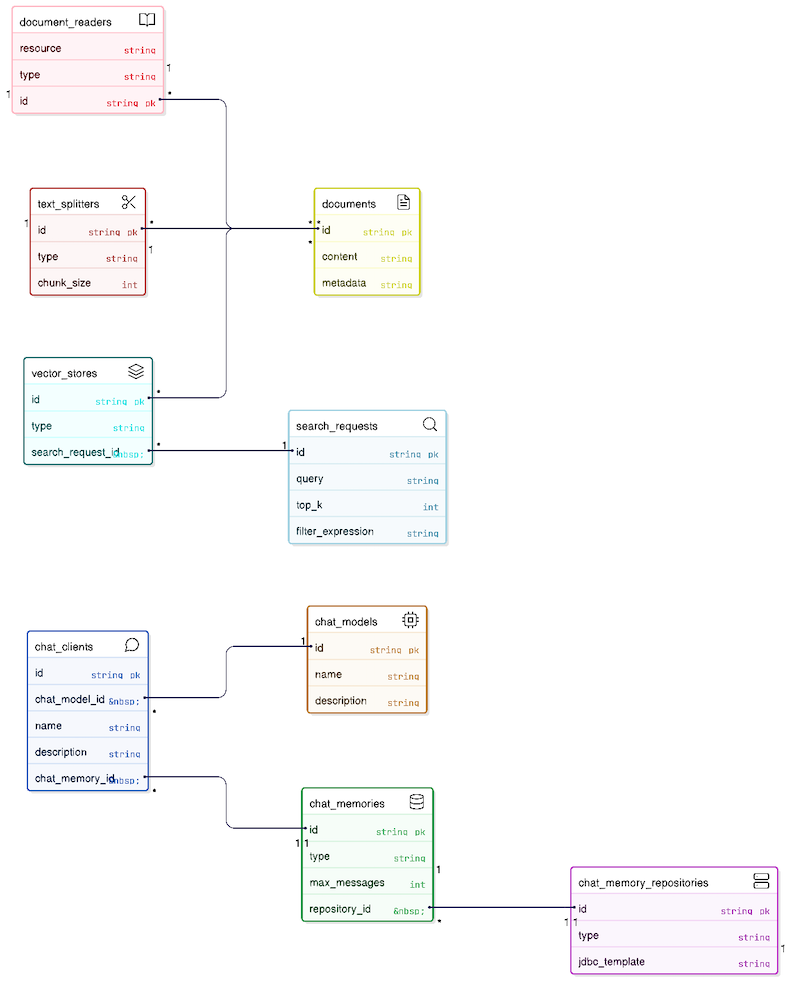
Class/Interface Name | Parent Class / Interface | Purpose | Examples |
|---|---|---|---|
ChatClient(I) | NA | Fluent API client for interacting with AI models (LLMs). | |
ChatModel(I) | NA | Low-level interface that connects directly to the AI Provider | |
ChatMemory(I) | NA | Interface for storing and retrieving chat conversation history. | |
JdbcChatMemoryRepository | ChatMemoryRepository(I) | Persists chat memory to a JDBC-compatible database | InMemoryChatMemoryRepository, CassandraChatMemoryRepository |
SearchRequest | NA | Request object to define search parameters. | |
Document | NA | Represents a text document with content and metadata. | |
PagePdfDocumentReader | DocumentReader | Reads PDF files and converts them into Document objects. | TikaDocumentReader, TextDocumentReader |
TokenTextSplitter | TextSplitter | Splits large documents into smaller chunks based on token count. | TextSplitter (Abstract), RecursiveCharacterTextSplitter |
Spring AI's abstractions allow you to switch underlying providers (e.g., swapping OpenAI for Azure or Ollama, or Postgres for Pinecone) with zero code changes to your business logic. They also eliminate boilerplate by providing a unified, fluent API (ChatClient) for common patterns like memory management, RAG, and function calling.
Auto-configuration with SpringBoot
In Python RAG, you have to wire everything manually:
load embedding model
pass embedding model into vector DB client
handle text → embedding conversions yourself
Spring AI kills that entire category of boilerplate.
So, if you include following dependency in you pom.xml
spring-ai-starter-model-openai , spring-ai-starter-vector-store-pgvector, spring-ai-pdf-document-reader, spring-ai-starter-model-chat-memory-repository-jdbc
Spring will:
detect the OpenAiEmbeddingModel
inject it automatically into the PgVectorStore
trigger embeddings implicitly whenever you call vectorStore.add() or .similaritySearch()
Process the documents
Enable memoization by keeping last 'n' messages in the context.
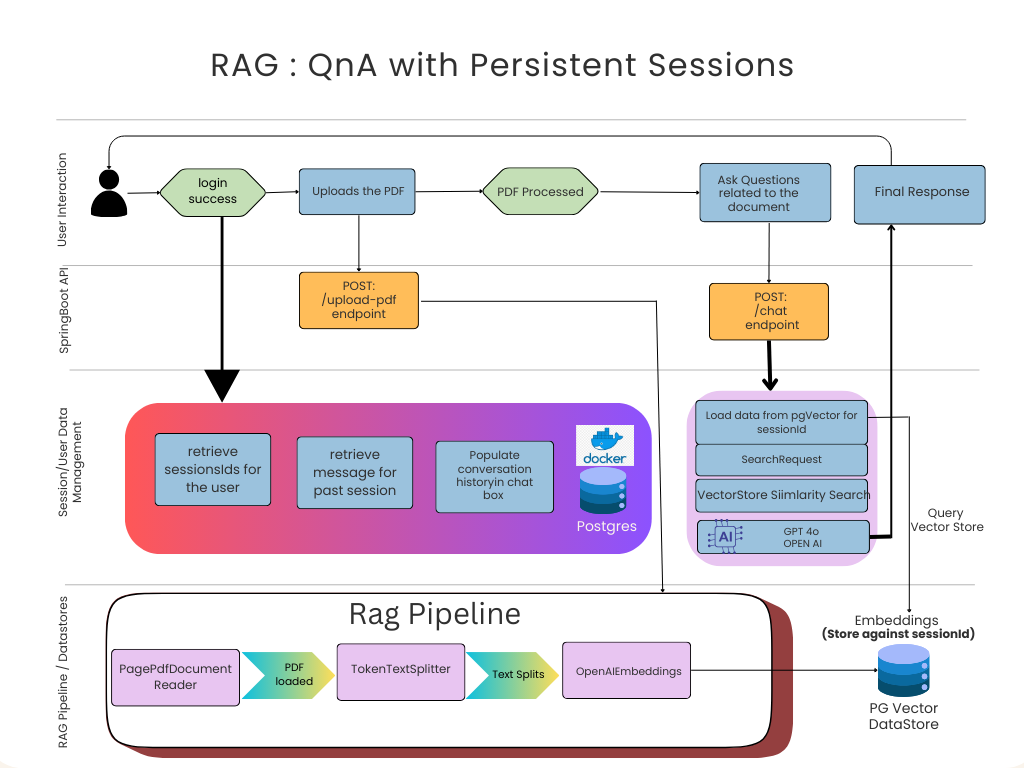
Architecture we’re building
For this RAG baseline, I'm using:
Spring Boot 3 + Java 21
OpenAI via Spring AI starter
pgvector inside PostgreSQL
SpringAI 1.0.3
Technical Walkthrough
1. PDF Ingestion Pipeline
Goal:
Read PDF → split into chunks → attach metadata → persist embeddings.
public void processPdf(File pdfFile, String sessionId) {
    PagePdfDocumentReader reader = new PagePdfDocumentReader(new FileSystemResource(pdfFile));
    List<Document> documents = reader.read();

    TokenTextSplitter splitter = new TokenTextSplitter();
    List<Document> splitDocuments = splitter.apply(documents);

    splitDocuments.forEach(doc ->
        doc.getMetadata().put("session_id", sessionId)
    );

    vectorStore.add(splitDocuments);  // Embeddings done implicitly
}
Points to notice:
The chunker is token-aware
Metadata tagging is mandatory if you want per-session isolation
Embeddings happen automatically under the hood
2. Retrieval + Response Generation
public String query(String sessionId, String question) {
        // save user message for UI history
        MessageEntity userMsg = new MessageEntity();
        userMsg.setSessionId(sessionId);
        userMsg.setRole("user");
        userMsg.setContent(question);
        messageRepo.save(userMsg);

        // 1. Retrieve similar documents
        SearchRequest request = SearchRequest.builder()
                .query(question)
                .topK(6)
                .filterExpression("session_id == '" + sessionId + "'")
                .build();
        List<Document> docs = vectorStore.similaritySearch(request);

        String context = docs.isEmpty() ? ""
                : docs.stream().map(Document::getText).collect(Collectors.joining("\n---\n"));

        // 2. Generate Response using ChatClient with Memory
        String systemText = "You are an AI assistant. Use the context to answer the question.\n" +
                "If the answer is not in the context, respond \"I don't have enough information.\"\n\n" +
                "Context:\n" + context;

        String answer = chatClient.prompt()
                .system(systemText)
                .user(question)
                .advisors(a -> a.param("chat_memory_conversation_id", sessionId)
                        .param("chat_memory_retrieve_size", 10))
                .call()
                .content();

        // save assistant message for UI history
        MessageEntity botMsg = new MessageEntity();
        botMsg.setSessionId(sessionId);
        botMsg.setRole("assistant");
        botMsg.setContent(answer);
        messageRepo.save(botMsg);

        return answer;
    }
Capabilities we’re using:
Top-K retrieval
Session filtering using metadata
Threshold-based recall filtering
Automatic embedding of the query
What to explore next ?
This is where Spring AI becomes more interesting than the standard Python RAG pipeline:
1. Model Context Protocol (MCP)
Standard, structured way for models to call tools or external data sources.
2. Function Calling
Let the LLM run Java methods — not hallucinate answers. This is how you move from RAG → agentic systems.
3. Multimodal ingestion
Images, tables, audio — not just text.
4. RAG evaluation framework
Automated scoring of answer accuracy, relevance, and grounding.
Demo & Source Code
📦 GitHub Repository: https://github.com/tpushkarsingh/rag_springai
🌐 Read more tutorials: https://blog.slayitcoder.in
💼 Connect with me on LinkedIn: https://www.linkedin.com/in/tpushkarsingh
Final Take
Spring AI finally gives Java developers a clean, maintainable, production-grade path to build RAG systems — without reinventing every AI primitive. If you’ve written enough glue code in Python, this feels refreshing.
And more importantly: This setup is stable enough to form the base of a real RAG product.